Moving Serverless from GCP to AWS: Cloud Run, Functions and Events
A plain-English guide to moving serverless apps from Google Cloud to AWS: Cloud Run, Cloud Run functions, App Engine, Eventarc, Cloud Tasks, Scheduler and Workflows. What replaces what, what behaves differently, what changes on the bill, and a step-by-step plan.
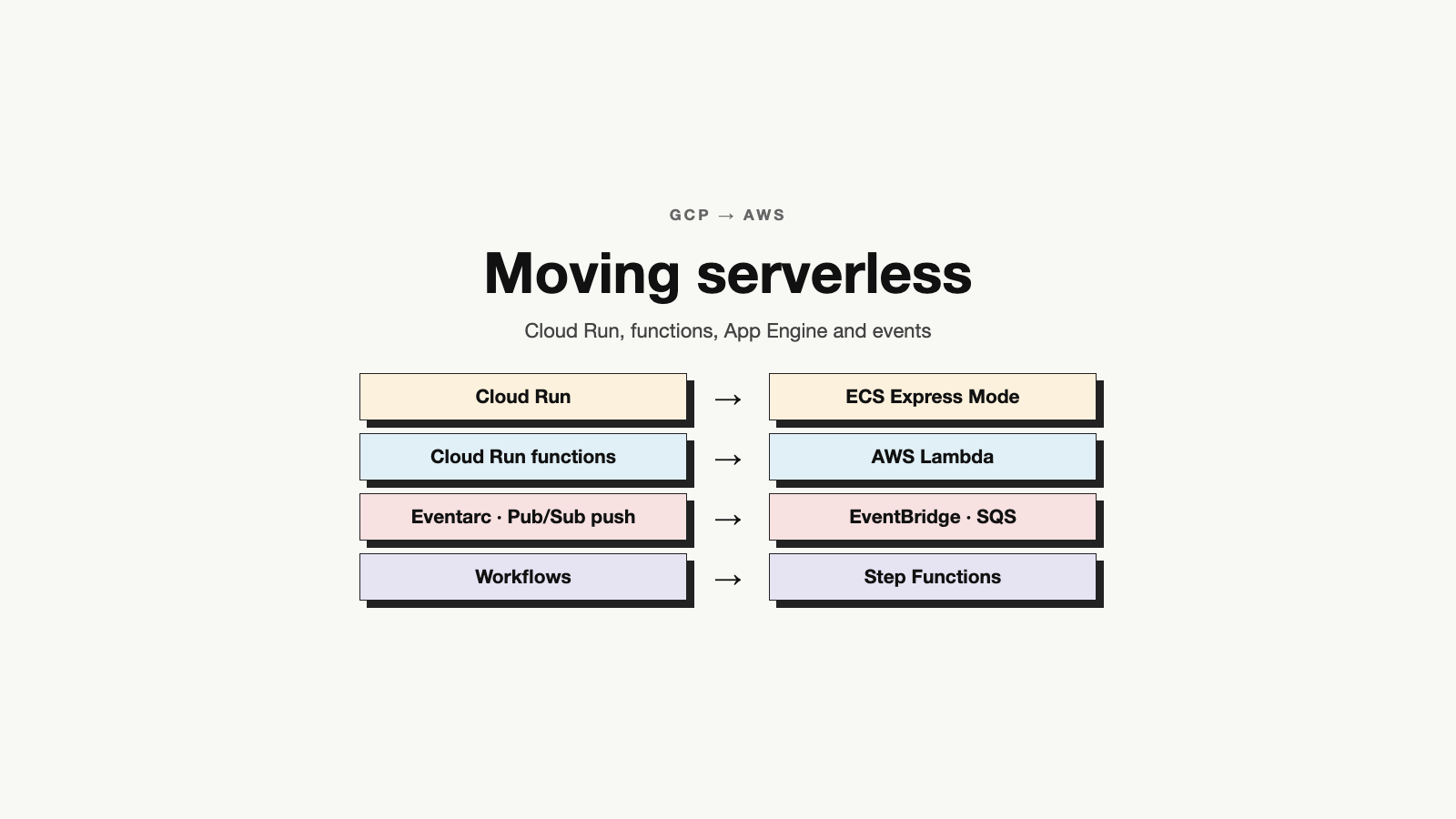
"Serverless" means you give the cloud your code, and it runs it for you. You don't pick servers. You don't patch them. You don't keep them running. The cloud starts your code when it is needed and stops it when it is not.
On Google Cloud (GCP), serverless usually means Cloud Run, Cloud Run functions and App Engine. It also means the services that connect them: Eventarc, Pub/Sub, Cloud Tasks, Cloud Scheduler and Workflows.
Teams move these apps to AWS for simple reasons. The rest of the company is on AWS. The data has already moved. Or the apps need to sit close to other AWS services.
Serverless looks like the easiest thing to move. There are no servers to copy. But each cloud has different default settings, and that is where the work is. Cloud Run sends many requests to one copy of your app. Lambda sends one request at a time. Cloud Run lets a request run for an hour. Lambda stops after 15 minutes. Small differences like these can break an app that worked fine on GCP.
"Serverless is, instead, a mindset: make technology decisions that further your ability to focus on what differentiates you as a business." — Ben Kehoe, AWS Serverless Hero, in his talk Serverless as a mindset
That is a good test for the move too. The goal is not to copy every GCP service one to one. The goal is to end up with less to look after. This guide covers:
- Which AWS service replaces each GCP serverless service
- What works differently, and what tends to break
- How events, queues and schedules move
- What changes on the bill
- A simple step-by-step plan
The Quick Map
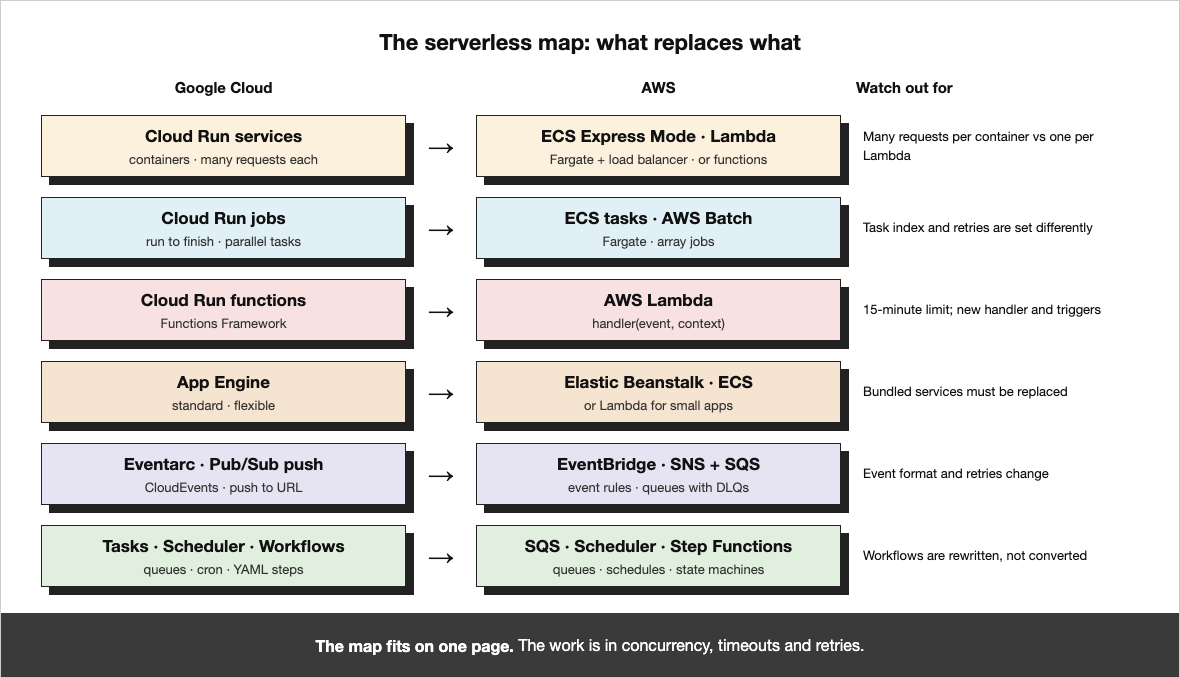
Here is each GCP serverless service and its closest match on AWS. The rest of the post explains each row.
| GCP | Closest AWS match | Watch out for |
|---|---|---|
| Cloud Run services | Amazon ECS Express Mode, or AWS Lambda | Cloud Run shares one copy of the app between many requests; Lambda does not |
| Cloud Run jobs | ECS tasks on Fargate, or AWS Batch | Task numbering and retries are set up differently |
| Cloud Run functions | AWS Lambda | 15-minute limit and a new code entry point |
| App Engine standard | Lambda, or Elastic Beanstalk | Old built-in services must be replaced |
| App Engine flexible | Elastic Beanstalk, or ECS on Fargate | app.yaml settings move to new config |
| API Gateway / Cloud Endpoints | Amazon API Gateway | Different login options and limits |
| Eventarc | Amazon EventBridge | Events look different, so code that reads them changes |
| Pub/Sub push | SNS and SQS, or EventBridge | Retries are set on the queue |
| Cloud Tasks | Amazon SQS with Lambda | SQS holds tasks; something must read them |
| Cloud Scheduler | EventBridge Scheduler | Each schedule names its own time zone and target |
| Workflows | AWS Step Functions | Workflows are rewritten, not converted |
| Secret Manager | AWS Secrets Manager, or Parameter Store | Access comes from the app's IAM role |
What about App Runner? It looks like the obvious match for Cloud Run. But AWS closed App Runner to new customers on April 30, 2026. For new apps, AWS points to ECS Express Mode instead.
Cloud Run: Containers or Functions
Cloud Run runs your app in a container (a package with your code and everything it needs). It adds copies when traffic grows and removes them when traffic stops. On AWS you have two good choices:
- ECS Express Mode is the closest match. You give it your container and two IAM roles. AWS sets up the rest: the service on Fargate, a load balancer, scaling and networking. Your container does not change. Like Cloud Run, one copy of the app can serve many requests at once.
- AWS Lambda runs your code only when a request comes in. You pay per request. It is great for small APIs and for traffic that comes in bursts. But a normal Lambda copy handles one request at a time. Lambda can also run container images, but your code must use Lambda's request format.
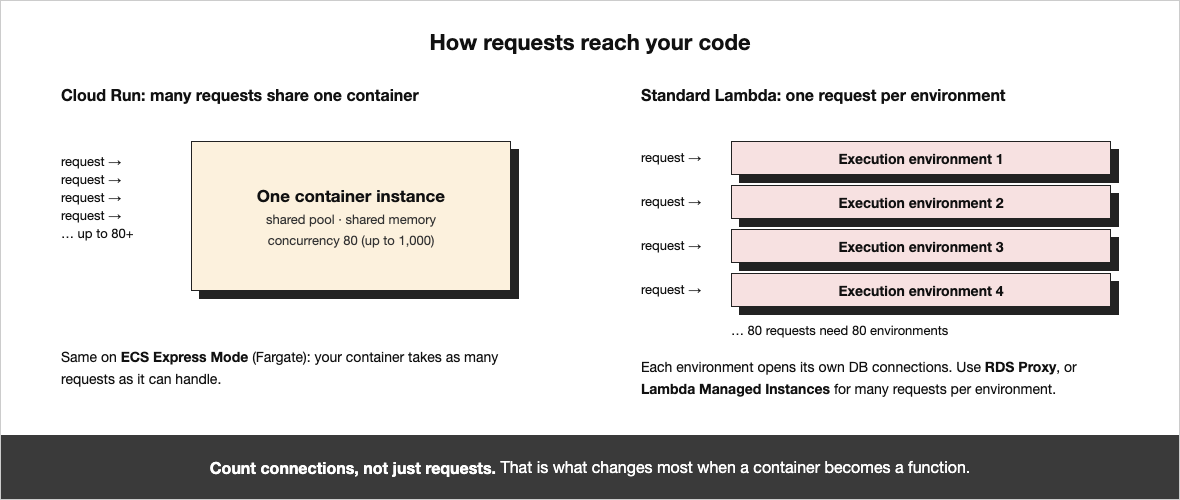
Here are the main differences side by side. The Lambda numbers come from the Lambda quotas page:
| Topic | Cloud Run | ECS Express Mode | Lambda |
|---|---|---|---|
| Requests per copy | Up to 1,000 (80 is common) | As many as your app can take | 1 |
| Longest request | 60 minutes | Set by the load balancer | 15 minutes |
| Scale to zero | Yes | No, at least one copy runs | Yes |
| Stay warm | Minimum instances | Minimum number of tasks | Provisioned concurrency |
| Largest request body | 32 MiB | Load balancer limits | 6 MB |
| What you deploy | Container | Container | Zip file or container |
Two things follow from this. First, database connections. On Cloud Run, 100 requests might share two copies of the app and a few connections. On Lambda, 100 requests means 100 copies, and each opens its own connections. The database can run out. Use RDS Proxy to share connections, or keep the app on ECS. Second, anything that runs for more than 15 minutes cannot go on Lambda as it is.
Then there are cold starts. A cold start is the short wait while Lambda starts a new copy of your code. Many teams worry about it too much:
"Cold starts that don't add to user-facing latency is generally not worth worrying about." — Yan Cui, AWS Serverless Hero, in Running Serverless at Scale
If users do feel it, turn on provisioned concurrency, which keeps copies ready, or SnapStart for Java, Python and .NET.
Rule of thumb: if the Cloud Run service is a full web app (a framework, a database, long requests), move the same container to ECS Express Mode. If it is a small API or webhook with spiky traffic, move it to Lambda.
There is also a middle option. Lambda Managed Instances run Lambda on EC2 machines that AWS looks after, and one copy can handle many requests at once. It suits steady, busy traffic. Your code must be safe to run many requests in parallel.
Cloud Run jobs
Cloud Run jobs run a container until the work is done, often as many tasks at once. On AWS, run the same container as an ECS task on Fargate. Start it from EventBridge Scheduler or Step Functions. For big jobs split into many parts, use AWS Batch array jobs. One small change: Cloud Run tells each task its number in CLOUD_RUN_TASK_INDEX. AWS Batch uses AWS_BATCH_JOB_ARRAY_INDEX.
Functions: Cloud Run Functions to Lambda
Cloud Run functions (once called Cloud Functions) map most directly to AWS Lambda. The idea is the same: a small piece of code that runs when a request or an event arrives. What changes is the code around it:
| Topic | Cloud Run functions | Lambda |
|---|---|---|
| Entry point | Functions Framework (@functions_framework.http) | handler(event, context) |
| Web address | Built in | Function URL or API Gateway |
| Started by events | Eventarc or Pub/Sub | SQS, SNS, EventBridge and others |
| Memory and CPU | Set one by one | Set memory; CPU grows with it |
| Longest run | 60 minutes for HTTP | 15 minutes |
| Local files | Kept in memory | /tmp, up to 10 GB |
Most of the work is in the entry point and the trigger, not in the business logic. Keep the logic in its own file. Then write a thin entry point for each cloud. That way you can test both with the same code.
App Engine
App Engine is GCP's oldest serverless service. How you move it depends on which kind you use:
- App Engine flexible already runs containers. Move it to ECS on Fargate. Or use Elastic Beanstalk if the team likes the "push code, get an app" style.
- App Engine standard apps on newer runtimes are normal web apps. Put them in a container and treat them like Cloud Run.
- Older App Engine apps use built-in services like Memcache, Task Queues, Users and Datastore. Each needs a new home on AWS: ElastiCache, SQS, Amazon Cognito and DynamoDB. This is real code work, so find these apps early.
App Engine also has small config files that are easy to forget. cron.yaml becomes EventBridge Scheduler schedules. dispatch.yaml becomes load balancer rules. queue.yaml becomes SQS queues.
Events, Queues and Schedules
Serverless apps talk to each other through events: "an order was placed", "a file was uploaded". This is where small differences cause the most bugs:
- Eventarc to EventBridge. Eventarc sends events in the CloudEvents format. EventBridge uses its own format, with fields like
source,detail-typeanddetail. Every function that reads an event needs a small change. - Pub/Sub push to SNS and SQS. Pub/Sub push calls your web address and tries again if it fails. On AWS, put an SQS queue in front of each reader. Lambda then reads the queue in batches. Messages that keep failing go to a dead-letter queue (a side queue for messages that could not be handled).
- Cloud Tasks to SQS. Cloud Tasks calls a web address for each task, at a rate you set. SQS only holds the tasks. Something has to read them. Use Lambda with a maximum concurrency setting to control the rate.
- Cloud Scheduler to EventBridge Scheduler. EventBridge Scheduler supports cron, time zones and one-time schedules. It can start Lambda, ECS tasks and Step Functions directly.
- Workflows to Step Functions. GCP Workflows are steps written in YAML. Step Functions are steps written in JSON. The ideas are the same (steps, retries, choices, waits), but each workflow is rewritten by hand.
Make every handler safe to run twice. On both clouds, a message can arrive more than once. On AWS, if one message in a batch fails, the whole batch is retried unless you report which ones failed. If a handler sends an email or charges a card, save an ID so it never does it twice.
APIs, Access and Identity
Who can call what works on the same idea in both clouds. Only the names change:
| GCP | AWS |
|---|---|
| Service account on a service | IAM role for the Lambda function or ECS task |
roles/run.invoker on a service | Lambda resource policy, or IAM login on a function URL |
| Services calling each other with tokens | IAM-signed calls, or a private API in API Gateway |
| "Allow unauthenticated" | A public function URL or public API |
| Identity-Aware Proxy | Load balancer login with Amazon Cognito |
| API keys in API Gateway | Usage plans and API keys in Amazon API Gateway |
Give each function or service its own IAM role, with only the access it needs. Don't make one big role for everything, even if the old apps shared one service account.
Networking You'll Trip Over
- Reaching private databases. Cloud Run reaches your private network through a connector or Direct VPC egress. Lambda can join your VPC (your private network on AWS). ECS tasks run inside it already.
- Reaching the internet from the VPC. A Lambda function inside a VPC cannot reach the internet on its own. It needs a NAT gateway, which costs money per hour and per GB. For AWS services like S3 and DynamoDB, use VPC endpoints instead. They are cheaper.
- Custom domains. A Cloud Run domain mapping becomes a certificate in ACM, plus a load balancer, CloudFront or an API Gateway custom domain.
- Calls back to GCP. During the move, some apps still call GCP. That is slower and costs money for data leaving GCP. Remove these calls first.
A Simple Way to Decide
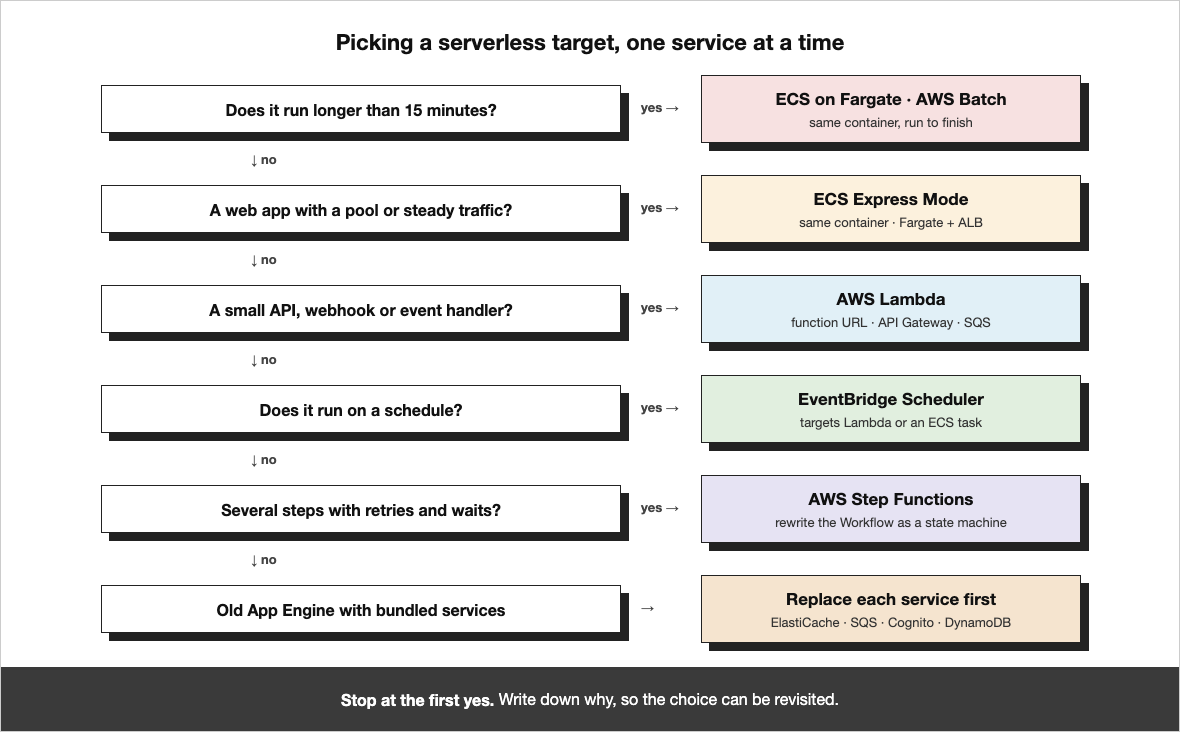
- Does it run for more than 15 minutes? Use ECS on Fargate or AWS Batch.
- Is it a full web app with a framework, a database or steady traffic? Use ECS Express Mode with the same container.
- Is it a small API, webhook or event handler? Use Lambda.
- Does it run on a schedule? Use EventBridge Scheduler to start a Lambda function or an ECS task.
- Does it run several steps in a row, with retries and waits? Use Step Functions.
What Changes on the Bill
Both clouds charge for the time your code runs and for each request. The details change the total:
| Topic | GCP | AWS |
|---|---|---|
| Pay per request | Cloud Run: CPU time, memory time, requests | Lambda: memory time and requests |
| Always-on containers | Cloud Run instance billing | Fargate: CPU and memory per second, plus the load balancer |
| Staying warm | Minimum instances (lower idle price) | Provisioned concurrency (paid while it is on) |
| APIs | API Gateway per call | API Gateway per call; HTTP APIs cost less than REST APIs |
| Events and queues | Eventarc, Pub/Sub, Cloud Tasks | EventBridge, SNS, SQS, all per request |
| Discounts | Committed use discounts | Compute Savings Plans (cover Lambda and Fargate) |
Three things catch teams out:
- The load balancer. ECS Express Mode puts a load balancer in front of your app. It costs money even with no traffic. Several apps can share one.
- NAT gateways. Lambda functions in a VPC that call the internet go through NAT. A lot of outgoing traffic becomes a surprise on the bill.
- Waiting time. On Lambda you pay while your code waits for other services. An app that spends most of its time waiting may be cheaper on Fargate.
Run the new setup for a few weeks before you buy a Savings Plan. Real usage is the only good basis for a commitment.
What It Looks Like in Code
A simple HTTP function on GCP and the same function on Lambda:
# GCP: Cloud Run function (Python)
import functions_framework

@functions_framework.http
def hello(request):
    name = request.args.get("name", "world")
    return {"message": f"Hello, {name}"}

# AWS: Lambda behind a function URL or HTTP API (Python)
import json

def handler(event, context):
    params = event.get("queryStringParameters") or {}
    name = params.get("name", "world")
    return {
        "statusCode": 200,
        "headers": {"Content-Type": "application/json"},
        "body": json.dumps({"message": f"Hello, {name}"}),
    }
A function that reads Pub/Sub messages, and the same function reading from SQS:
# GCP: triggered by a Pub/Sub topic through Eventarc
import base64, json
import functions_framework

@functions_framework.cloud_event
def on_order(cloud_event):
    data = base64.b64decode(cloud_event.data["message"]["data"])
    process(json.loads(data))

# AWS: triggered by an SQS queue, with partial batch failures
import json

def handler(event, context):
    failed = []
    for record in event["Records"]:
        try:
            process(json.loads(record["body"]))
        except Exception:
            failed.append({"itemIdentifier": record["messageId"]})
    return {"batchItemFailures": failed}
And a Cloud Run service in Terraform, next to the same Lambda function:
# GCP: a Cloud Run service
resource "google_cloud_run_v2_service" "api" {
  name     = "api"
  location = "us-central1"
  template {
    containers {
      image = "us-docker.pkg.dev/shop-prod/apps/api:1.4.2"
      resources { limits = { cpu = "1", memory = "512Mi" } }
    }
    scaling { min_instance_count = 1 }
    max_instance_request_concurrency = 80
    service_account = google_service_account.api.email
  }
}

# AWS: the same API as a Lambda function from a container image
resource "aws_lambda_function" "api" {
  function_name = "api"
  package_type  = "Image"
  image_uri     = "123456789012.dkr.ecr.us-east-1.amazonaws.com/api:1.4.2"
  memory_size   = 1024                    # CPU grows with memory
  timeout       = 30
  role          = aws_iam_role.api.arn    # was the service account
}

resource "aws_lambda_function_url" "api" {
  function_name      = aws_lambda_function.api.function_name
  authorization_type = "AWS_IAM"         # was roles/run.invoker
}
These snippets show the shape, not every setting. Check the current docs before you copy them.
Things That Bite Later
"Failures are a given and everything will eventually fail over time." — Werner Vogels, CTO of Amazon, in 10 Lessons from 10 Years of AWS
These are the small things that tend to break after the move:
- Timeouts in a chain. API Gateway REST APIs stop waiting after 29 seconds by default. A Lambda behind it can run longer, but the caller has already given up. Check every timeout from the user to the database.
- Large uploads. Lambda takes up to 6 MB per normal request. Big file uploads that worked on Cloud Run should go straight to S3 with a pre-signed URL.
- Things kept in memory. Code that keeps a cache or a counter in memory acts differently when every request has its own copy of the app.
- Logs and alerts. Cloud Logging searches and alerts become CloudWatch Logs Insights queries and CloudWatch alarms. Rebuild the alerts people rely on before you move traffic.
- Secrets. Secret Manager paths like
projects/.../secrets/...become Secrets Manager or Parameter Store names. Search your code for all of them. - Limits. New AWS accounts start with a low Lambda concurrency limit. Ask for more weeks before you move real traffic.
Doing the Move, Step by Step
- List everything. Every Cloud Run service and job, function, App Engine app, trigger, queue, schedule and workflow, with its traffic, run time, cost and owner.
- Pick the AWS service for each one, using the questions above. Write down why.
- Build the base: AWS accounts, networks, a container registry (ECR), IAM roles, logs, alarms and higher limits. The Serverless Applications Lens is a good checklist.
- Start with one small app. Move it end to end: code, triggers, secrets, alarms and domain.
- Run both clouds side by side. Send a small share of users to AWS using weighted DNS in Route 53. Compare errors and speed.
- Move the events. Point schedules and queues at AWS one at a time. Empty the GCP queues before you turn them off.
- Clean up. Turn off the GCP services, delete old service accounts and keys, and buy Savings Plans once usage is steady.
"Serverless is still the future because the mindset shift is the thing we haven't gotten to." — Ben Kehoe, AWS Serverless Hero, speaking to SD Times
Serverless is often the fastest part of a cloud move, because there are no servers to copy. The work is in the default settings: how many requests one copy takes, how long a request may run, and how events are retried. Get those right, and the rest is mostly config.
Common Questions
What is the Cloud Run equivalent in AWS?
ECS Express Mode is the closest: same container, one copy serving many requests, with AWS setting up Fargate, the load balancer and scaling. AWS Lambda fits small APIs and bursty traffic. App Runner is another option for simple web apps.
Cloud Run vs Lambda: which should I pick?
Pick Lambda for small APIs, webhooks and event handlers that can scale to zero. Pick ECS for full web apps, steady traffic, requests longer than 15 minutes, or bodies over 6 MB. Watch database connections: on Lambda every request is its own copy, so use RDS Proxy.
Cloud Run vs Fargate: what changes?
ECS on Fargate runs the same container, but it does not scale to zero, so at least one task runs all the time and a load balancer sits in front of it. In return you get long requests and many requests per copy, like Cloud Run.
How do I migrate Cloud Functions to Lambda?
The business logic usually stays. What changes is the entry point (Functions Framework becomes handler(event, context)), the trigger (Eventarc or Pub/Sub becomes SQS, SNS or EventBridge), and the 15-minute run limit. Keep the logic in its own file and write a thin entry point for each cloud.
Eventarc vs EventBridge: what is different?
Eventarc sends CloudEvents. EventBridge uses its own shape with source, detail-type and detail. Every function that reads an event needs a small change.
What is the Cloud Tasks equivalent in AWS?
Amazon SQS with Lambda. SQS holds the tasks but does not call anything, so Lambda reads the queue, and the maximum concurrency setting controls the rate. Failed tasks go to a dead-letter queue.
What is the App Engine equivalent in AWS?
App Engine flexible moves to ECS on Fargate or Elastic Beanstalk. Standard apps on newer runtimes go in a container. Older apps that use Memcache, Task Queues, Users or Datastore need ElastiCache, SQS, Cognito and DynamoDB. cron.yaml becomes EventBridge Scheduler.
About MigrateX
MigrateX is our platform and service for moving software, data and infrastructure from one technology to another. It combines automation with experienced engineers. The automation does the repetitive work quickly, and the engineers make the tricky decisions.
Here's how we run a GCP to AWS serverless move with MigrateX:
- Assessment. We list every Cloud Run service, function, App Engine app, trigger, queue, schedule and workflow, with its traffic, run time, cost and owner. You see where the work is before anyone agrees on a timeline.
- Plan. We work with your team to pick the AWS target for each service, design the IAM roles and networking, and decide the order of the move.
- Migration, step by step. Automation does the repetitive parts: rewriting handlers and event formats, turning Cloud Run and App Engine config into ECS, Lambda and EventBridge, and converting Terraform. Our engineers handle the parts that need thought: long-running work, concurrency, App Engine bundled services and Workflows.
- Proof that it works. Both clouds run side by side. We shift traffic a little at a time and compare errors, response times and costs before each step.
- Handover and clean-up. We turn off GCP services one at a time, set up Savings Plans once usage is steady, and leave your team with a setup they understand and own.
What you get along the way:
- No big-bang switch. Traffic moves a little at a time, with a quick way back.
- No lost events. Queues and schedules move one at a time and are drained before anything is turned off.
- A smaller bill, not a bigger one. Right-sized functions, shared load balancers and Savings Plans are part of the move, not an afterthought.
- One partner for the whole move. The same team and approach covers your serverless apps, your compute and your data.
Planning a move from GCP to AWS? We'd love to hear about it. Tell us a little about your setup through Contact Us, and we'll start with a free chat about where the work is likely to be.
References
AWS
- AWS. AWS App Runner availability change. https://docs.aws.amazon.com/apprunner/latest/dg/apprunner-availability-change.html
- AWS. Amazon ECS Express Mode. https://docs.aws.amazon.com/AmazonECS/latest/developerguide/express-service-overview.html
- AWS. AWS Fargate for Amazon ECS. https://docs.aws.amazon.com/AmazonECS/latest/developerguide/AWS_Fargate.html
- AWS. Understanding Lambda function scaling. https://docs.aws.amazon.com/lambda/latest/dg/lambda-concurrency.html
- AWS. Lambda Managed Instances. https://docs.aws.amazon.com/lambda/latest/dg/lambda-managed-instances.html
- AWS. Create a Lambda function using a container image. https://docs.aws.amazon.com/lambda/latest/dg/images-create.html
- AWS. Lambda SnapStart. https://docs.aws.amazon.com/lambda/latest/dg/snapstart.html
- AWS. Using Lambda with Amazon SQS. https://docs.aws.amazon.com/lambda/latest/dg/with-sqs.html
- AWS. Handling errors for an SQS event source in Lambda. https://docs.aws.amazon.com/lambda/latest/dg/services-sqs-errorhandling.html
- AWS. Giving Lambda functions access to resources in a VPC. https://docs.aws.amazon.com/lambda/latest/dg/configuration-vpc.html
- AWS. Amazon EventBridge. https://docs.aws.amazon.com/eventbridge/latest/userguide/eb-what-is.html
- AWS. Amazon EventBridge Scheduler. https://docs.aws.amazon.com/scheduler/latest/UserGuide/what-is-scheduler.html
- AWS. AWS Step Functions. https://docs.aws.amazon.com/step-functions/latest/dg/welcome.html
- AWS. AWS Batch. https://docs.aws.amazon.com/batch/latest/userguide/what-is-batch.html
- AWS. Amazon RDS Proxy. https://docs.aws.amazon.com/AmazonRDS/latest/UserGuide/rds-proxy.html
- AWS. Lambda quotas. https://docs.aws.amazon.com/lambda/latest/dg/gettingstarted-limits.html
- AWS. Provisioned concurrency for Lambda. https://docs.aws.amazon.com/lambda/latest/dg/provisioned-concurrency.html
- AWS. Quotas for REST APIs in API Gateway. https://docs.aws.amazon.com/apigateway/latest/developerguide/api-gateway-execution-service-limits-table.html
- AWS. Serverless Applications Lens, AWS Well-Architected. https://docs.aws.amazon.com/wellarchitected/latest/serverless-applications-lens/welcome.html
- AWS. Weighted routing in Route 53. https://docs.aws.amazon.com/Route53/latest/DeveloperGuide/routing-policy-weighted.html
- AWS. AWS Elastic Beanstalk. https://docs.aws.amazon.com/elasticbeanstalk/latest/dg/Welcome.html
Expert sources
- Ben Kehoe. Serverless as a mindset. Serverless Boston meetup talk. https://www.meetup.com/serverless-boston/events/262376552/
- Ben Kehoe, quoted in Getting a serverless reality check. SD Times. https://sdtimes.com/cloud/sd-times-blog-getting-a-serverless-reality-check/
- Yan Cui. Running Serverless at Scale. https://www.slideshare.net/theburningmonk/running-serverless-at-scale
- Werner Vogels. 10 Lessons from 10 Years of Amazon Web Services. All Things Distributed, 2016. https://www.allthingsdistributed.com/2016/03/10-lessons-from-10-years-of-aws.html
Google Cloud
- Google Cloud. Cloud Run quotas and limits. https://cloud.google.com/run/quotas
- Google Cloud. Maximum concurrent requests for services. https://cloud.google.com/run/docs/about-concurrency
- Google Cloud. Cloud Run functions overview. https://cloud.google.com/functions/docs/concepts/overview